Controllers & input
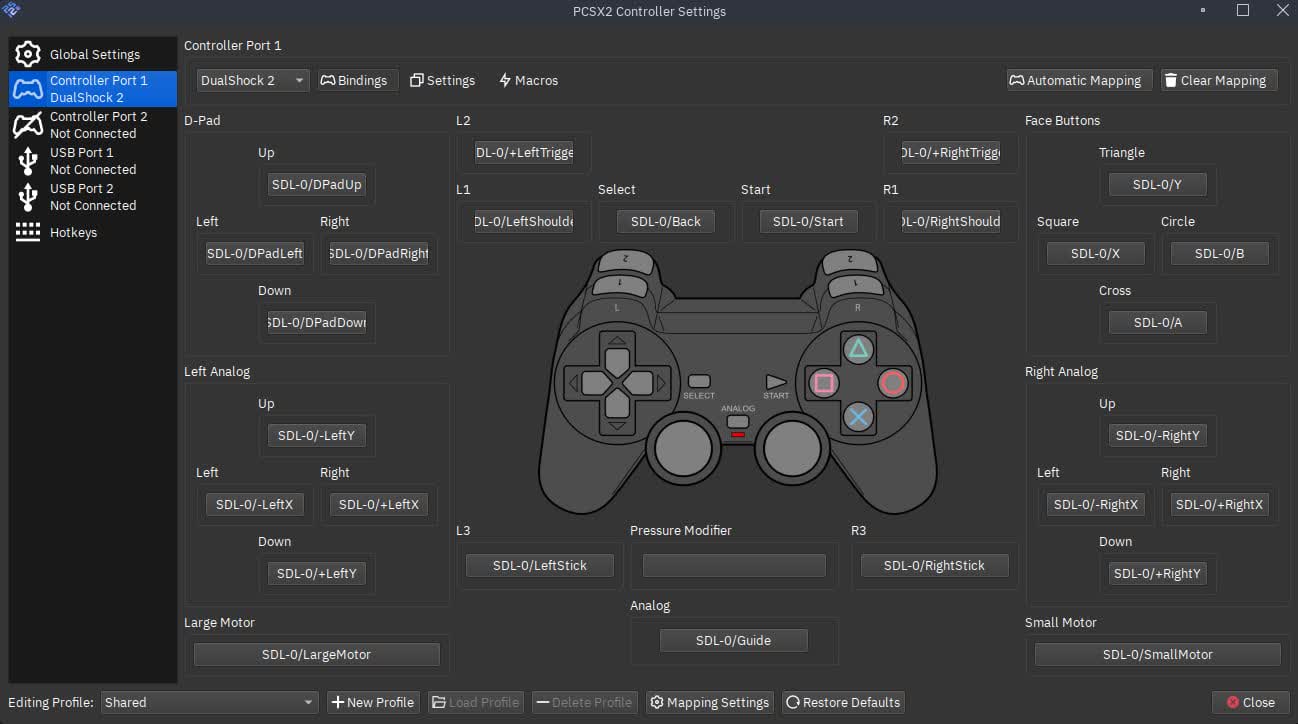
Map keyboards, gamepads, and more so your setup feels natural.

Free · Open source · Windows · Linux · macOS
PCSX2 is free, open-source software. This site is an independent curated guide—start with the download page and setup guide for builds and first steps.
We don’t distribute builds from this domain—use the download page to find trusted sources.
Signal · preview only
100%
Free & open source
3
Desktop platforms
HD
Upscaling & more
∞
Community
Product
What players and tinkerers get from PCSX2—summarized. Details on our features page.
Map keyboards, gamepads, and more so your setup feels natural.
Memory cards and save states help you progress on your terms.
A huge library of titles—see the compatibility page for pointers.
Actively maintained with stable and development builds from the project.
Project docs cover settings, troubleshooting, and best practices—start from help & troubleshooting and setup on this site.
Voices
Informal patterns people often share—verify details with our help section and upstream sources.
Finally ran my childhood games in HD. Took a bit of setup but the docs helped.
Community member
Forum pattern
Switched to Vulkan on my laptop and performance jumped. Worth updating drivers.
Community member
Common tip
Open source done right—no paywall, just a BIOS you must supply yourself.
Community member
Typical note
About
PCSX2 emulates the PlayStation 2 so you can run compatible games from legal dumps you create yourself. Releases and documentation are published through public channels from the upstream project.
pcsx2.io is an independent guide: clearer navigation to topics like download safety, specs, setup, and troubleshooting.
Guides
Deep pages for each topic. Cross-check sensitive steps with the help section
What PCSX2 offers
Graphics, saves, controllers
Open DownloadWhere to get builds
Stable & nightly builds
Open SpecsHardware requirements
CPU, GPU, RAM
Open SetupFirst-time steps
BIOS & games (legal)
Open GamesCompatibility
Compatibility lookup
Open StoriesCommunity tips
Informal patterns
Open HelpTroubleshooting
Help & doc links
Open CommunityExternal resources
Sponsor, social links
OpenGet a build from our download page—then follow the setup guide for BIOS paths and first launch.
Reference
A dense, varied appendix for the home page—different blocks so you can scan what matters. All paths stay on this guide unless noted.
The emulator is open-source software. You must supply your own BIOS from hardware you own where the law allows, and use game images you legally possess.
We only curate guidance. Builds change often; follow the download page for trusted-source practices.
PCSX2 targets all three. Requirements shift by renderer and resolution—see system requirements.
Keyboards and common gamepads work; mapping is per-game comfort. Overview on features.
Try different sync modes, verify dumps, update GPU drivers, then skim troubleshooting.
Compatibility varies by title, region, and build. Treat compatibility as orientation, not a guarantee.
“Patience beats random downloads—verify sources, then tune.”
This block is intentionally different from the hero and CTA: denser text, mixed list styles, and an internal-only link set.
| Symptom | Try first | Then |
|---|---|---|
| Black screen | Verify dump, renderer | Compatibility notes |
| Audio crackle | Sync modes, latency | Driver update |
| Low FPS | Native res test | MTVU, power plan |
| Crashes in menus | Update build | Default settings |
Appendix
A second, longer layer at the bottom of the home page: prose, myths, a sample folder layout, and more internal links. Structurally unlike the FAQ block above.
Many players want access to libraries they already own on original media, or to study how classic titles behaved on real hardware. Emulation can also be a practical way to enjoy games on modern displays when consoles are unavailable or fragile.
This site does not host games or BIOS files, and it is not a replacement for reading license terms in your country. Treat every step as your own responsibility.
We avoid promising compatibility for a specific title, mirroring unknown files, or endorsing third-party “complete packs.” Instead we point you to safe download practices, setup, and troubleshooting on this domain.
If something reads like legal advice elsewhere on the web, verify it with a qualified source—our pages are technical orientation only.
Names vary by OS and version—always follow docs shipped with your build.
PCSX2/
├── bios/
│   └── (your dumps here)
├── cheats/
├── inis/
├── logs/
└── memcards/
Labels above are for curiosity and search—documentation in your install remains authoritative. This appendix exists to make the home page substantially deeper than a single hero + CTA.
Field notes
Another dense strip at the bottom of the home page: different UI patterns from appendix 1 (FAQ) and appendix 2 (myths/pre). Internal links only.
Start from native or near-native, prove stability, then add upscale. Big jumps in internal resolution can hide whether a bug is content-related or settings-related.
Cross-check with features when you experiment.
Map once, duplicate profiles only when needed. Analog deadzones and sensitivity differ between fighting games, platformers, and racing titles.
See setup for BIOS and paths first.
Keep one clean rip per disc, avoid chaining converters you do not understand, and store memory-card backups outside the emulator tree when testing nightlies.
Use download hygiene before chasing errors.
| Angle | Software | Hardware | Notes |
|---|---|---|---|
| GPU load | Often higher CPU | Often higher GPU | Depends on res & effects |
| Precision | Reference-like | Fast paths | Some games need one mode |
| Debugging | Easier isolation | More variables | Log + minimal steps |
| Laptops | May throttle | Power modes matter | See specs |
| When stuck | Try first for glitches | Try for speed | Help page |
“Document the baseline before chasing miracles—most ‘random’ bugs are a stack of small changes.”
Hardware emulation is sensitive to timing, drivers, thermal headroom, and the quality of your disc images. No web page can replace iterative testing on your machine. When in doubt, reduce variables: default settings, native resolution, a title you trust, and a single controller profile.
The guides here are written to be read in any order—start where your pain is: download, setup, help, or compatibility.
Layer four
A fifth “fold” of depth at the bottom of the home page: different from FAQ, prose appendices, and field notes—mixed cards, fake load bars (cosmetic), and machine-readable links.
Grab guidance from download, place firmware per setup, launch one calm title before touching upscale.
Export profiles, read packaged notes, reinstall cleanly if plug-ins paths moved. Re-test the same three saves you trust.
One game, one profile, note every toggle. Escalate to help checklists when you have repro steps.
Not live metrics—visual rhythm for scanning.
Read
Skim guides before threads.
Save
Back up cards before hacks.
Measure
FPS window vs feel.
Rest
Long sessions need breaks.
Closing line · appendix 4
This block is intentionally dense: five scenario-sized ideas, five steps, four icon rows, four quick links, three decorative bars, and two columns of prose—roughly five times the substance of a minimal footer strip, in a layout you have not yet seen duplicated above.
Layer five
Another ~5× “footer strip” of unique material: asymmetric grid, speed vs accuracy framing, illustrative shell lines, and keyboard affordances—none of this duplicates appendix 1–4 layouts.
When performance or visuals misbehave, shrink the problem space: one game session, one controller, one renderer family, one resolution ladder. Document the baseline, then change exactly one knob and re-test. This mirrors how help pages on this site are meant to be used—methodical, not chaotic.
If you only read one other page after this home appendix, pair setup with compatibility expectations before chasing “perfect” graphics.
Pulse
Nightlies can fix regressions—or introduce them. Keep a rollback plan.
Snapshot
GPL-3.0
License anchor for upstream code—not legal advice here.
# verify file exists (example)
test -f ./bios/SCPH-XXXX.bin && echo "bios present"
# export a note for your future self
echo "baseline: native / vulkan / profile-v1" > ./notes-session.txt
Signal A
Stutter that tracks with audio often points to sync or driver stacks—see help.
Signal B
Crashes on boot can be plug-in paths or bad images—validate before forums.
Signal C
Stories on experiences are patterns, not prescriptions.
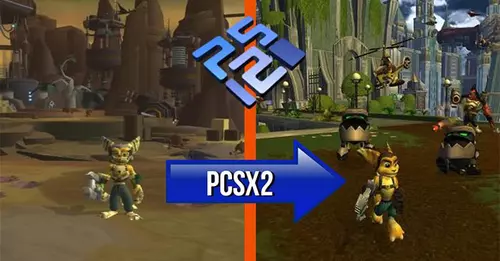
Decorative asset strip—optional branding texture above the site footer. If the image fails, the text still stands alone.
Layer six
A fifth density pass at the home bottom: structured data in a table, collapsible Q&A, a tag cloud, a scoring rubric (illustrative), a milestone line, and pull-quote tone—distinct from bento, VS, shell, and appendix 4 patterns.
| Situation | Primary page | Secondary |
|---|---|---|
| First install, verify sources | download.html | requirements |
| BIOS, paths, controllers | setup.html | features |
| Crashes, glitches, audio | troubleshooting | compatibility |
| Discord, etiquette, links | community.html | experiences |
Download safety, setup, compatibility, troubleshooting, and community links—organized for quick navigation.
PCSX2 expects a legal dump from hardware you own. Setup explains placement and naming conventions in general terms.
Use sitemap.xml for crawlers; humans can follow the table above or footer columns.
Scores are metaphorical—use them to think, not to flex.
Session arc
Media
Prefer verified dumps; odd rips skew results.
Input
Map once, test in UI, then in-game.
Audio
Latency stacks: OS → driver → emu → game.
Appendix 6 close
Roughly five times a thin footer in surface area: one table, three toggles, eight tags, one rubric, one quote, five recipe steps, one milestone strip, three icon tiles—formats you had not stacked in layers 4–5.
Topic clusters for PCSX2: install, tune compatibility, and get help.
Games & features